When the screen goes black, you have two options: spend the next hour troubleshooting Netflix by unplugging your router and reinstalling the app, or take the two minute route to find out if the issue is even on Netflix’s end. This guide will help you do both — confirming whether Netflix is down, reading the error code on your screen, and fixing the far more common case where Netflix is fine and your TV isn’t.
“Netflix is down” means the streaming service has issues on their end, not on yours. Check Netflix’s official outage page and Downdetector to confirm it isn’t an outage on your end. If both are quiet, the fault is almost certainly your device, network, or app — so read the error code shown on your screen before you troubleshoot anything.
Is Netflix down right now?
Netflix status at a glance (November 2, 2026)
According to UptimeRobot, Is The Service Down, and instatus, as of November 2, 2026, all reports show that Netflix is operating normally. Report volume sits inside its usual range and there are no reports of a wide-spread outage.
Here’s the recent record:
- Most recent widely reported disruption: August 27, 2026. As of 12:13 p.m. PT, more than 3,000 users had filed Downdetector reports, mainly showing website and server connection issues and an error code on screen, NSEZ-503.
- Most recent independently detected incident window: 47 minutes, on August 4, 2026, as reported by Is The Service Down’s detection history.
What to do first if your stream just stopped
Look at the two live sources in the next section before you touch a single control on your TV. The order is important.
Also, understand the meaning of a green light. “No problems detected” doesn’t mean your stream is OK. It means the problem is probably local, which is what the rest of this page is about.
How do you check whether Netflix is actually down?
Use three types of source and not one. They measure different things and often don’t agree.
Netflix’s official status page — and its one big blind spot
help.netflix.com/en/is-netflix-down is Netflix’s only official page that explains a problem on Netflix’s side. It’s also the most commonly misinterpreted page in this whole topic.
This page serves as an incident notification hub and is not a live green/red status page, like many people incorrectly assume. In Netflix’s own words, “If we are experiencing an interruption to our streaming service, we’ll keep this page up to date with a description of the problem.” Otherwise, the page redirects you to Help Center search, account sign-in, or Contact Us, and provides no always on indicator.
Because of that design, a reader hits the “official” page during a genuine incident, sees no notification because Netflix hasn’t posted one yet, and assumes it’s their TV. The page provides no information to educate the reader that the page is only populated once Netflix acknowledges a problem.
Downdetector, Is The Service Down and uptime probes
Downdetector and Is The Service Down are crowd reported trackers. Their tracking relies on reports from users, so they surface spikes within minutes. Thus, they are faster than Netflix’s own acknowledgement.
Uptime probes — UptimeRobot, isitdownrightnow, instatus — ping endpoints to check if a service is reachable. Uptime probes that do this for Netflix report back that Netflix is reachable, but reachability doesn’t mean stream quality.
| Source type | Example | What it measures | Blind spot |
|---|---|---|---|
| Official | help.netflix.com/en/is-netflix-down | Incidents Netflix has acknowledged | Shows nothing until Netflix posts; no live indicator |
| Crowd-reported | Downdetector, Is The Service Down | User report volume and location | Spikes on regional and ISP-specific faults that aren’t Netflix’s |
| Uptime probe | UptimeRobot, isitdownrightnow, instatus | Endpoint reachability | Can return a healthy response while playback is broken |
Why these three sources often disagree
Netflix doesn’t publish any incidents unless they are acknowledged. Crowd trackers spike based on regional and ISP level issues. While uptime probes report reachability, playback may still fail. Reading all three together may help you get a better idea of what is going on. Trusting one of them may give you the wrong answer.
The report distribution may also help. Many distributed reports across the country may be an issue with Netflix or a major ISP. A single geographic cluster may be an issue with a regional network, and may be an issue with yours.
Netflix is up but still broken for you — the diagnostic sequence nobody publishes
This is the common case. Every tracker says “no problems detected,” and Netflix still won’t play on your TV. This is the reason people check if Netflix is down at all, and this is the part most guides skip to say you should restart your router.
Work through it in this order.
Read the error code before you touch the hardware
Read what is on the screen first. Codes may tell you what layer of your system is broken. These are free and may help you identify the problem, and it takes five seconds.
- NW-prefixed codes may indicate an issue with your network.
- UI-800-3 may indicate an issue with stored app data on your device.
- NSEZ-5xx and other server errors indicate Netflix is at fault, and a localised solution is not the case.
What your specific symptom says about where the fault is
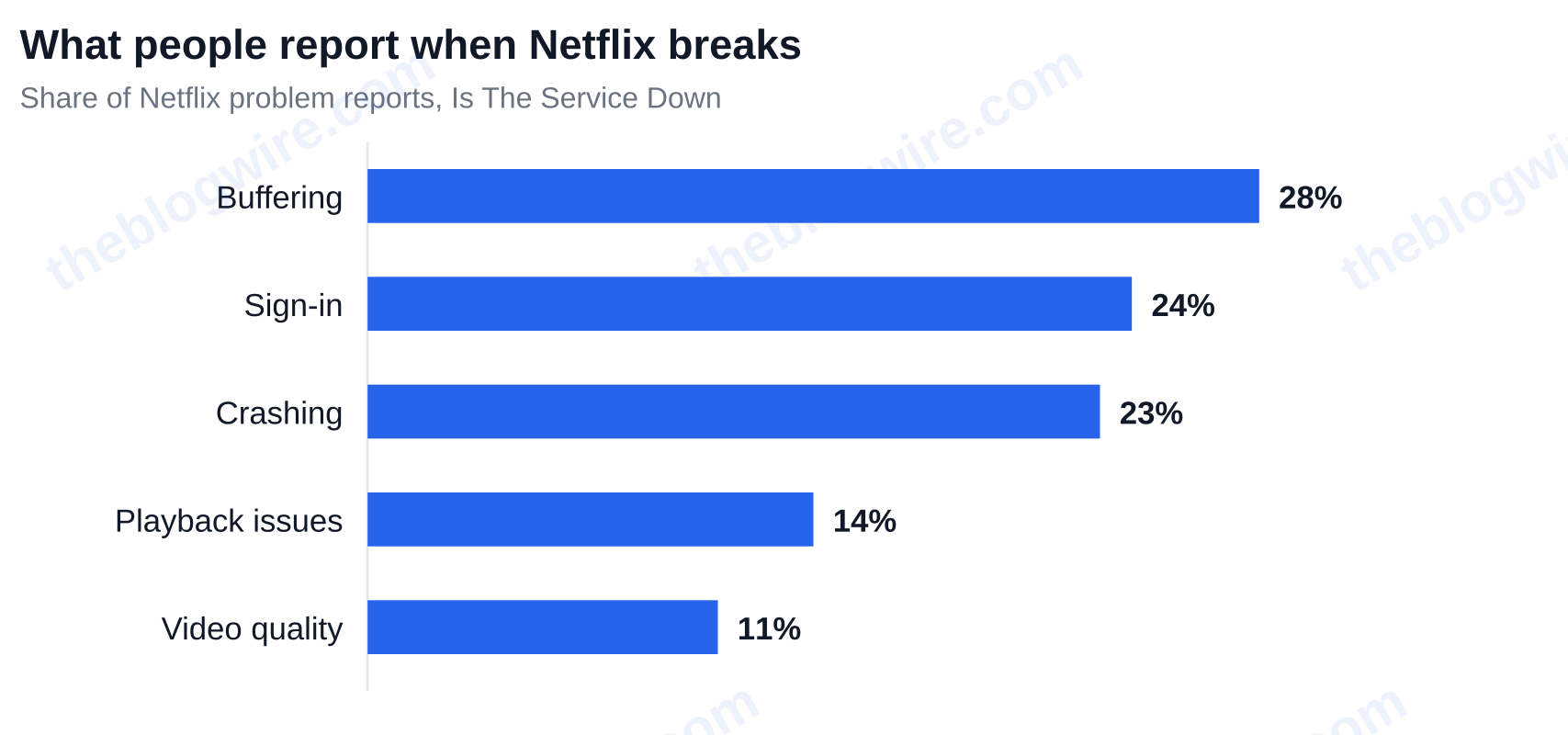
Is The Service Down shows the specifics of the problems that users report for Netflix. They are buffering (28%), sign-in (24%), crashing (23%), playback issues (14%), and video quality (11%). Most people consider these statistics as irrelevant details. They are very useful in determining the next steps to take.
- Sign-in failure definitely points at the auth and account paths at Netflix, and not your bandwidth.
- Buffering alone is the symptom most likely to be associated with your own connection speed.
- Crashing on one device while another device is able to play without a problem points at an app-level fault on that device.
Two different problems can present with exactly the same symptoms on screen and need completely different responses. A correct diagnosis is greatly dependent on the symptoms.
The two-minute isolation test: second device, second network
- Go to Netflix on your phone using the mobile data connection — not your home Wi-Fi. That switches the device and the connection at once.
- Broken everywhere? The fault is Netflix or your ISP. Broken on one device? The problem is that device.
- Now test other services. Are YouTube and Spotify also stuttering? Then that points at your connection, not Netflix.
- Only then should you start troubleshooting, and focus on the layer that the evidence points at, not the entire list.
When “just restart your router” is the wrong advice
With the error code NSEZ-503 on August 27, 2026, the reported trigger was a demand spike around a major content event, causing a server failure at Netflix. Anyone who spent that window clearing their caches, uninstalling and reinstalling the Netflix app, and even factory-resetting their router fixed nothing — and lost an hour doing it.
Troubleshooting guides and articles usually take the ‘all failures are local’ approach. Server-error codes are the named exception.
What do Netflix error codes mean?
As opposed to using generics to try to figure out the issue, Netflix maintains a separate help article for each on-screen message they display, effectively a one-to-one message-to-cause mapping. Use that instead of a generic fix list.
| Code or message | Likely cause | Who fixes it |
|---|---|---|
| NW-prefixed codes, including NW-2-5 | Network connectivity between your device and Netflix — not an account or app fault | You |
| UI-800-3 | Corrupted or stale stored Netflix app data | You — clear the device cache or reinstall |
| NSEZ-503 and 5xx-class errors | Netflix’s own servers | Netflix — wait it out |
| Code 100 / “Netflix is Currently Unavailable” | App needs updating, or the network path to Netflix is blocked | You |
| “Sorry, we could not reach the Netflix service (-2)” | A distinct connection-error condition with its own help path | You |
| “We’re having a problem connecting to Netflix” | A separate connection-error condition, again with its own fix path | You |
| “Unfortunately Netflix Has Stopped” (Android) | App or system update needed | You |
Network codes (NW-prefixed, including NW-2-5)
If your error code starts with NW, chances are high you have an issue with your connectivity between your device and Netflix. Work at the network layer with your router, modem, Wi-Fi signal, and your wired connection.
App and stored-data codes (UI-800-3, “Netflix Has Stopped”)
UI-800-3 means stored app data has gone bad. Clear your app cache or reinstall the app. Do not reset your network for this one. On Android, “Unfortunately Netflix Has Stopped” could also mean you have an app or system update pending.
Server-side codes (NSEZ-503 and 5xx-class errors)
Stop troubleshooting. This is Netflix’s side, as it was in August 2026. In the case of server-side codes (and 5xx class errors in general) you’re powerless to do anything but wait it out.
Connection messages (-2, “Currently Unavailable”, code 100)
These look similar and aren’t. Treat each message as a case by case basis, as Netflix keeps a dedicated article per message — so match your exact on-screen wording rather than guessing from a generic list.
How do you fix Netflix when it’s not working on your device?
Order matters: least destructive first, so you never reinstall before you’ve restarted. The universal sequence:
- If you can, shut off the Netflix app for a minute and see what happens.
- A power cycle — unplugging your device for 30 seconds, not just standby — will usually resolve most issues.
- A reset of your modem and router may be all that is necessary.
- Signing out and back into your Netflix account may resolve the issue.
- If that doesn’t work, you may need to clear the app’s data and cache.
- Update the app.
- Last resort: uninstall and reinstall the app.
Fix it on a smart TV, streaming stick or game console
If you have a Fire TV, Apple TV, Roku, PlayStation, or Xbox, there are specific troubleshooting steps for you in Netflix’s device-specific troubleshooting guide. Follow yours rather than a generic one. A full power cycle at the wall resolves more of these than any in-app setting.
Fix it on a phone or tablet
For a phone or tablet, if clearing the app’s cache and storage doesn’t do the trick, you may need to update the OS — and confirm you aren’t on a restricted work or school network that blocks streaming.
Fix it in a web browser
For a browser, hard refresh the page and delete your cookies for netflix.com. If that doesn’t work, try disabling your extensions, or use a private window or a second browser to rule out an extension conflict.
Rule out your VPN, proxy, DNS or ISP
Netflix blocks many VPN and proxy endpoints. That produces Netflix-only errors that look exactly like an outage while every other site loads perfectly. Disable the VPN and flush your DNS before you conclude anything.
What’s happening to Netflix is just as possible with your ISP. Routing problems and peering congestion hit Netflix first, as they use a ton of bandwidth. A single service failure can absolutely be your provider’s fault.
How long do Netflix outages last, and what should you do while you wait?
Typical outage length, based on recent incidents
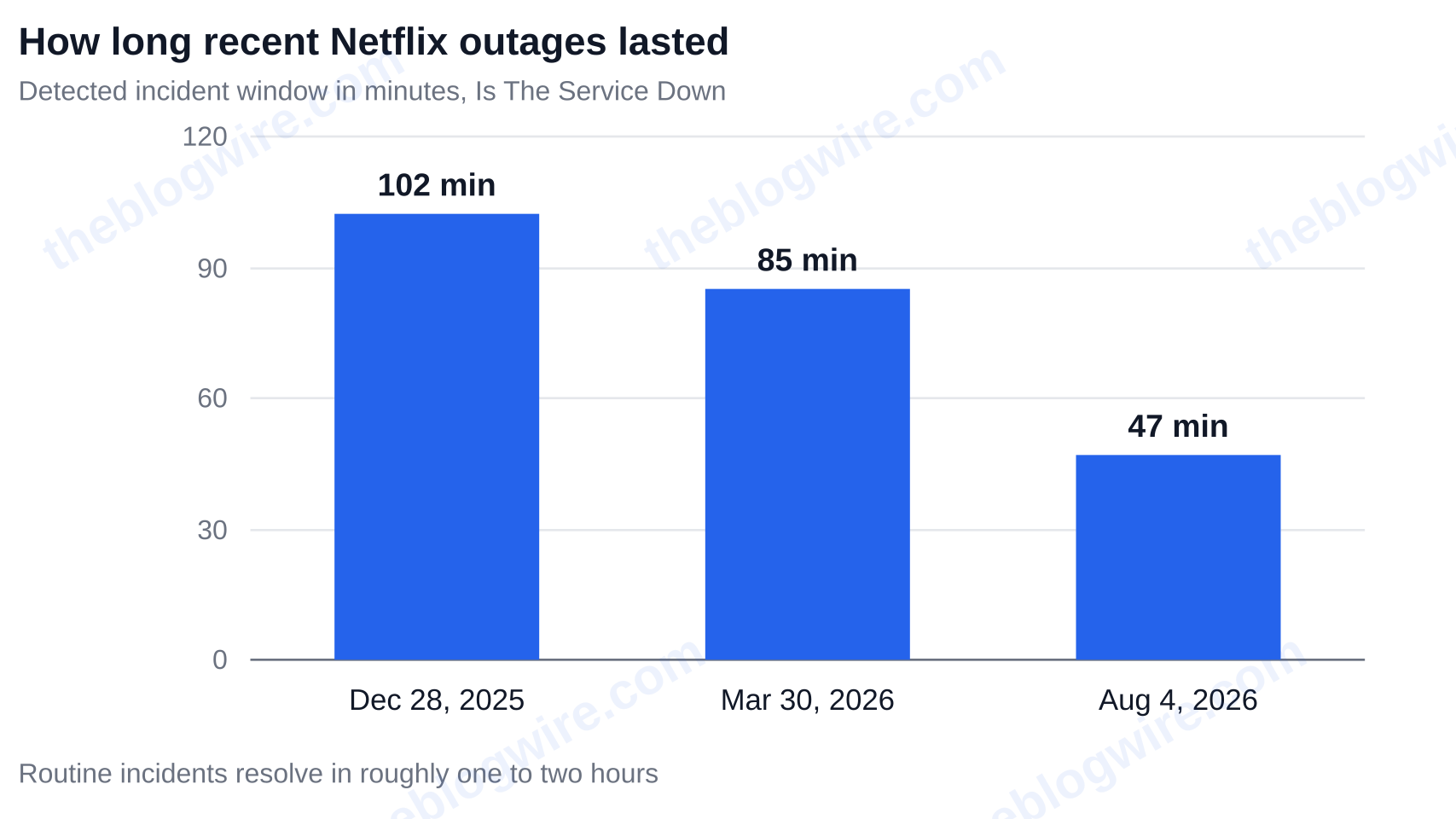
Most incidents are short. Independent window detections done by Is The Service Down showed times of 47 minutes on August 4, 2026, 85 minutes on March 30, 2026, and 102 minutes on December 28, 2025.
These times provide a rule to make a decision. Most routine incidents resolve themselves in roughly one to two hours. Hours-long downtime is the signature of a live-event traffic spike, not a routine failure.
| Incident | Duration or peak scale | Likely cause |
|---|---|---|
| Jake Paul vs Mike Tyson livestream | Reports rose from 406 at 7:27 p.m. ET to 99,876 by 9:42 p.m. ET; peak near 193,000 complaints in one 15-minute window (~215 per second) | Simultaneous live viewing at extreme scale |
| August 27, 2026 | 3,000+ Downdetector reports as of 12:13 p.m. PT; NSEZ-503 on screen | Demand spike around a major content event |
| August 4, 2026 | 47 minutes | Routine incident |
| March 30, 2026 | 85 minutes | Routine incident |
| December 28, 2025 | 102 minutes | Routine incident |
Why Netflix breaks during live events and big releases
During live events, many users concentrate demand on the same service at the same time, causing a surge in demand. During non-live events, users can disperse their viewing across many different time intervals. Everyone presses play in the same minute.
Demand during the Jake Paul vs Mike Tyson fight is a great example. Per Sherwood News’ analysis of Downdetector data, reports of an outage began at 406 at approximately 7:27 p.m. ET and by 9:42 p.m. ET 99,876 users reported outages. At its worst, Downdetector reported roughly 193,000 outage reports during a single 15 minute period, which equates to roughly 215 reports per second. The August 2026 NSEZ-503 outage was determined to be caused by the same underlying pattern: a demand spike around a major content event.
What to do during a confirmed outage
- Stop troubleshooting. There’s nothing you can do on your end — nothing on your end is broken.
- Leave your equipment as is. Don’t reinstall, factory-reset, or change settings you’ll have to undo later.
- File one Downdetector report if you want to help confirm the extent of the issues.
- Check the status page on Netflix every 15–20 minutes.
Will Netflix refund or credit you for downtime?
No. Netflix will not give you a credit or refund for this — there are no automatic outage credits, and short incidents aren’t compensated. Contacting support is generally only worth your while for extended, account specific failures that last for days, not for a 47 minute blip.
Putting it together
Figuring out whether Netflix is down is usually a two minute question, not a two hour question. Check help.netflix.com/en/is-netflix-down and Downdetector. If both of those say everything is quiet, read your error code and run the second-device, second-network test before you change anything.
Codes starting with NW mean your network, UI-800-3 means your app data, and NSEZ-5xx means Netflix. Ordinary incidents clear in under two hours.
Your next step: open Netflix on your phone over mobile data right now. If it plays, the issue is with the device you were watching on, and the device specific fixes above are where to start.
Rule of thumb: read the code before you reach for the plug. Browse more explainers on The Blog Wire for related reads.
People Also Ask
Why does Netflix keep buffering when my internet speed tests fine?
Speed tests measure the internet by sending a short burst of data to a nearby server and back. Netflix is accessing the internet in a different way. It’s accessing a longer, more consistent stream of data over a particular route. Because of this, routing problems and peering congestion at your ISP can cause buffering even if your speed test looks okay. Buffering is also the single most-reported Netflix symptom — 28% of all reported issues about Netflix to Is The Service Down are buffering issues — and it’s the one most likely to be your own connection rather than Netflix. To test your connection, try to stream something long on YouTube. If it stutters too, it’s your connection.
Does Netflix have an official status page, and why does it often show nothing during an outage?
Yes, it’s help.netflix.com/en/is-netflix-down, but it’s an incident-notification hub, not a live green/red dashboard, so it’s not a good source for a live status. Netflix states that if it is experiencing an interruption it will keep that page updated with a description of the problem; when nothing has been posted, the page just routes you to Help Center search, sign-in, and Contact Us. If they haven’t posted anything, that means they haven’t acknowledged a fault yet. An empty page does not mean your stream is okay. Often, when there’s a problem with Netflix, it is shown by crowd trackers like Downdetector minutes before anything is posted by Netflix.
Why is Netflix the only app not working on my TV when everything else is fine?
Usually it’s three things. First, a VPN or proxy. Netflix blocks a lot of endpoints, which causes Netflix-only errors while all other sites load normally. Second, stored app data. Error code UI-800-3 specifically means corrupted Netflix app data, fixed by clearing the cache or reinstalling. Third, your ISP. Netflix’s huge bandwidth demands mean routing and peering problems hit it before anything else. Disable your VPN, flush DNS, and then check your error code.
Should I reinstall the Netflix app during an outage?
No. If your error is NSEZ-503 or any other 5xx-class server error, the problem is on Netflix’s end and re-installing the app won’t do anything. During the August 27, 2026 disruption there were over 3,000 Downdetector reports as of 12:13 p.m. PT, from a demand spike around a major content event. Users got NSEZ-503 and doing local trouble shooting was a waste of time. Re-installing the app should only be done as a last resort, and only after you confirm the problem is with your device.